
How long does it take to train an AI model on cloud GPUs?
Minutes for a small fine-tune, days for a 7B model from scratch, months for a frontier run. The formula, real published runs and wall-clock tables.
Training an AI model takes anywhere from a few minutes to several months, and on Nodus a small fine-tune went from submission to exported model in under five minutes in our published benchmark. The clock depends on model size, training tokens and GPU count: by our math a 7B language model trained from scratch on 140 billion tokens takes about 3.6 days on 64 NVIDIA H100s. Nodus also estimates time and cost before you launch; below we show the planning formula, check it against published runs, and list what stretches the real clock.
How do you estimate how long a training run will take?
Section titled “How do you estimate how long a training run will take?”Work out the total math the run needs, then divide by how fast your GPUs actually do math. Training a transformer takes about 6 floating-point operations per parameter per token, the rule from Kaplan et al.’s scaling-laws paper. An NVIDIA H100 SXM peaks at about 989 teraFLOPS of dense BF16 math, half the sparse figure on NVIDIA’s H100 page.
No real run gets the full peak. The share you get is called model FLOPs utilization, and 30% is a fair planning number for code you have not tuned. That gives:
GPU-hours = (6 × parameters × tokens) / (989e12 × utilization × 3,600)wall-clock = GPU-hours / number of GPUs (if scaling were perfect)At 30% utilization, one H100-hour delivers about 1.07 × 10^18 useful operations. The second line is the optimistic part, and we come back to it below.
How long does it take to train a language model from scratch?
Section titled “How long does it take to train a language model from scratch?”Days to weeks for small and mid-size models, if you have enough GPUs. Here is the formula at 30% utilization, using a compute-optimal budget of about 20 tokens per parameter from DeepMind’s Chinchilla paper, plus one longer 7B run.
| Model and tokens | H100 GPU-hours | Fewer GPUs | More GPUs |
|---|---|---|---|
| 1B on 20B tokens | 112 | 1 GPU: 4.7 days | 8 GPUs: 14 hours |
| 7B on 140B tokens | 5,505 | 8 GPUs: 28.7 days | 64 GPUs: 3.6 days |
| 7B on 2T tokens | 78,643 | 64 GPUs: 51.2 days | 512 GPUs: 6.4 days |
| 70B on 1.4T tokens | 550,500 | 512 GPUs: 44.8 days | 2,048 GPUs: 11.2 days |
Our arithmetic: 6 × parameters × tokens, 989 teraFLOPS dense BF16, 30% utilization, perfect scaling. Real runs land later; see the overheads section.
Token count moves the clock as much as model size. The same 7B model takes 14 times longer on 2 trillion tokens than on 140 billion. Many open models now train far past the Chinchilla ratio, so settle the token budget first. Our post on what it costs to train an LLM prices the same GPU-hours in dollars.
How long do real published training runs take?
Section titled “How long do real published training runs take?”Small reproductions take hours, and frontier models take months. Andrej Karpathy’s llm.c reproduction of GPT-2 124M trained on 10 billion tokens in about 90 minutes on one 8 × NVIDIA A100 80GB node. His GPT-2 1.6B run took about 24 hours on one 8 × H100 node: 32,000 steps of roughly 1 million tokens each, at about 2.75 seconds per step.
That 1.6B run is a good check on the formula. It works out to 192 GPU-hours for about 33.6 billion tokens, which back-solves to roughly 46% utilization. Karpathy’s own logs show 42% to 47% at the start, so well-tuned code beats our 30% planning figure by about half.
At the top end, Meta’s Llama 3.1 model card lists 30.84 million H100 GPU-hours for the 405B model. The Llama 3 paper says it trained on up to 16,384 H100s. Divide one by the other and even that cluster needs about 78 days of pure compute, a floor on the real calendar time.
Do more GPUs make training proportionally faster?
Section titled “Do more GPUs make training proportionally faster?”Only roughly, and never for free. Adding GPUs splits the same GPU-hours across more machines, so the bill stays about the same while the calendar shrinks. In practice the bill creeps up, because GPUs spend more time talking to each other.
Meta’s own numbers show the effect. The Llama 3 paper reports 43% utilization on 8,192 GPUs and 41% on 16,384 GPUs for the same model, a small but real loss from doubling the cluster.
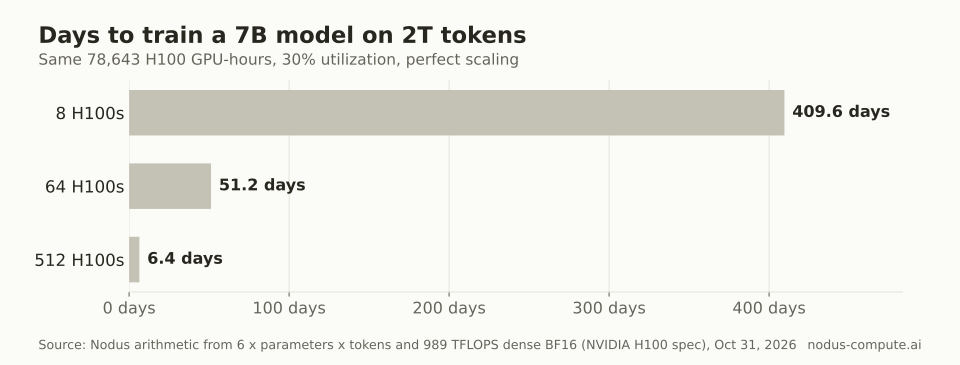 The same 78,643 GPU-hours: one 8-GPU node needs 409.6 days, a 512-GPU cluster about a week.
Our decision rule: pick the smallest GPU count that finishes before your deadline, not the largest you can get. Single nodes of 8 GPUs scale best because the GPUs share fast NVLink links. Multi-node runs add network cost and more machines that can fail.
How long does fine-tuning take?
Section titled “How long does fine-tuning take?”Usually minutes to a few hours, because fine-tuning sees far fewer tokens than pretraining. Fine-tuning a 7B model on 50 million tokens is about 2 H100-hours of math at 30% utilization by the same formula, and LoRA does less than that because it skips most weight gradients.
For small jobs, the work around training often takes longer than training itself. In our published fine-tuning benchmark, Qwen2.5-0.5B on one NVIDIA L4 spent 112.8 seconds in the training loop on Nodus. From submission to a verified exported model took 4.8 minutes, or 288 seconds.
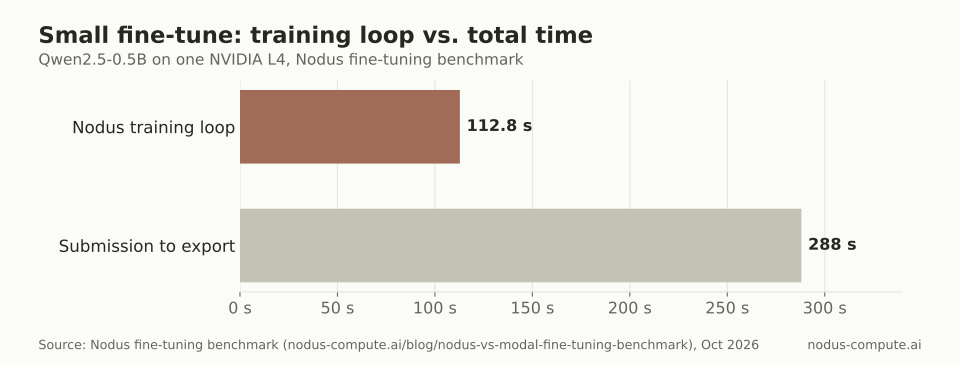 For a small fine-tune, startup, evaluation and export took longer than the training loop.
So for fine-tuning, the honest answer to “how long” is mostly startup, model download, evaluation and export. Our walkthrough on fine-tuning Llama on your own data shows where those steps sit in a real job file. On Nodus, a TrainingJob imports a pinned Hugging Face model revision into a read-only Volume once, and later runs reuse it, so billed GPU time is not spent downloading weights.
Why does the real clock run longer than the math?
Section titled “Why does the real clock run longer than the math?”Because the formula counts only useful training steps. Four things add time on most projects:
- Waiting for capacity. A large multi-GPU request may queue until enough machines are free together.
- Startup. Pulling the image, loading the model and reading the first batch of data.
- Failures and restarts. Over a 54-day stretch of Llama 3 405B pretraining, Meta logged 466 job interruptions, 419 of them unexpected. It still reported more than 90% effective training time, meaning at least a tenth of the elapsed time did no useful training.
- Evaluation and export. Validation passes and writing out the final weights.
Our planning rule is to add at least 10% to the formula for multi-day runs. Go higher if your checkpoints are far apart, since every restart redoes the work since the last save.
How does Nodus show the time before you launch?
Section titled “How does Nodus show the time before you launch?”A dry run returns the estimate before anything is charged. For a managed TrainingJob, the training guide says the estimate is the number of steps times the measured seconds per step on the slowest GPU type you allowed, plus evaluation time. You can set spec.expectedDuration to use your own figure.
$ nodus apply -f sft.yaml --dry-run -o yaml # status.estimate: cost to completion, first hold, start timeFor your own script, nodus run takes the same idea from flags. This prints the estimate only, using your expected duration:
$ nodus run --dry-run --gpu H100:8 --expected-duration 24h -- torchrun train.pyThe server-side estimate goes further. Per the placement docs, --dry-run=server -o estimate returns the expected cost at p50 and p90, the startup time (cold, and warm when idle capacity of yours fits), the first hold and the minimum charge. That startup figure is the part the formula above leaves out, so add it to your plan for short jobs.
If the run must finish by a date, --complete-by (or placement.completeByTime) keeps it off any capacity whose p90 finish is later. If nothing can make the deadline, the run waits in Queued and the estimate says MissesDeadline instead of starting a job that will finish late. H100s are listed at $2.60/hr on the Nodus pricing page, checked November 11, 2026.
If a machine is lost mid-run, Nodus starts a new attempt from the latest committed checkpoint, as described in attempts and recovery. Our post on how often spot GPUs are interrupted shows how much that matters on cheaper capacity.
How long does it take to train a model like GPT-4?
Section titled “How long does it take to train a model like GPT-4?”Nobody outside the lab knows, because the GPU-hours were never published. The closest public figure is Llama 3.1 405B at 30.84 million H100 GPU-hours, which is months even on a cluster of more than 16,000 GPUs.
Can I train a useful model on a single GPU?
Section titled “Can I train a useful model on a single GPU?”Yes, if it is small or a fine-tune. Karpathy notes his GPT-2 124M run would take roughly 4 to 24 hours on a single GPU, depending on the card.
Is a faster GPU always worth it for training time?
Section titled “Is a faster GPU always worth it for training time?”Not always. A GPU that costs twice as much per hour but runs the job 2.5 times faster is cheaper overall, and one that runs it 1.5 times faster is not. Compare per-step time on your own model; our B200 vs H100 post works through that break-even for one pair of GPUs.
What happens to training time if a GPU fails mid-run on Nodus?
Section titled “What happens to training time if a GPU fails mid-run on Nodus?”On a checkpointed run you lose the work since the last committed checkpoint plus the new attempt’s startup, not the whole run. Nodus restores your checkpoint files on the new machine, never process memory, so your script must load its own checkpoint when it starts, as the attempts and recovery page explains.
Does training time include data preparation?
Section titled “Does training time include data preparation?”No, none of the figures here do. Tokenizing and cleaning a large dataset is usually CPU work that you can finish before you pay for any GPU time.
More from the blog
training9 min read
How do you fix CUDA out of memory errors in PyTorch?
Read what the OOM error says, then cut the biggest consumer: activations, optimizer state or fragmentation. An ordered checklist with GB math and code.
Read the postpricing9 min read
What are the best Google Colab alternatives for training in 2026?
Colab caps sessions at 12 or 24 hours and doesn't publish its limits. The best alternatives for long training runs, with costs and a decision rule.
Read the post